
How to Test a User Onboarding Flow Before Product Launch

Your onboarding is often a new user’s first meaningful interaction with your product. For an early-stage startup, that first experience can strongly shape whether a user understands what to do next.
Most teams check that the user onboarding flow works. The buttons click. The emails arrive. The welcome screen loads. Then they ship.
But “it works” and “a stranger can figure it out” are two different things. Your team knows the product too well to see what a first-time user sees. That gap can create friction that leads some users to stop before they reach the product’s first meaningful value.
This guide shows you how to test a user onboarding flow before product launch, from defining the first-value action to testing with first-time users, measuring friction, and retesting after fixes.
Onboarding testing works best once the product experience has started to take shape. If you’re still checking whether the problem and demand are real, start with our guide to validate your startup idea before building an MVP.
What Is a User Onboarding Flow?
A user onboarding flow is the path a new user takes from signup to their first meaningful result in your product.
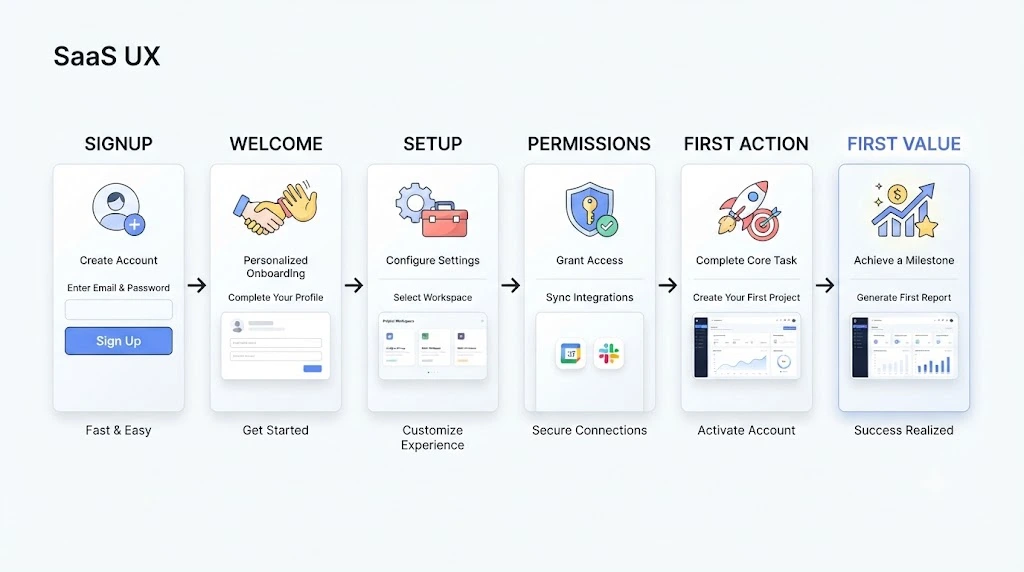
Think of it as the bridge between “I created an account” and “Oh, this is useful.” Different products build that bridge differently, but most onboarding flows include these stages:
- Signup or account creation
- Welcome or intro screen
- Profile or initial setup
- Permissions and integrations
- First key action
- First meaningful value (often represented by a product-specific activation event)
Some teams call this an onboarding user flow. Same idea. It is the sequence of screens, emails, prompts and decisions that sit between a new user and the moment your product shows its worth.
Why Test Your Onboarding Flow Before Product Launch?
Because fixing usability problems before launch can be less disruptive than discovering them after real users run into them.
New users don’t know your assumptions. They don’t know which button matters or why you asked for their phone number. Something obvious to your team can be a dead end for them.
Small friction points can add up. One confusing label, one extra form field, one unexplained permission request. Each one gives a new user a reason to pause or leave.
Testing before launch lets you identify these problems with a smaller group of test users before they affect a wider audience.
What You Can Discover Before Launch
Pre-launch testing often surfaces problems like these:
- Confusing instructions
- Too many steps
- Unnecessary form fields
- Permission requests that feel out of nowhere
- Broken or unclear CTAs
- Users getting stuck on a screen
- Users who never reach first value
How to Test a User Onboarding Flow Before Launch
This is the main process. Follow these steps to gather clearer evidence about where your onboarding helps users and where it creates friction.
1. Define the First-Value Action
Start with one question: what should a user successfully do by the end of onboarding?
That action can become your activation event if it represents a meaningful value milestone for your product. For a project tool, it might be creating a first project and inviting a teammate. For a fitness app, it might be logging a first workout.
Your activation event should be defined around the behavior that shows a user has reached meaningful value in your product. Some products use a single action. Others combine several behaviors.
Keep two things separate:
- Completed onboarding: the user clicked through every screen.
- Experienced value: the user actually got a result.
A user can finish all the steps and still miss the point.
2. Map the Complete Onboarding User Flow
Write down every step from signup to the first-value action. Be thorough.
Include screens, emails, permission pop-ups, tooltips and redirects. Many teams forget the confirmation email or the screen that appears after login. Those are exactly the places users can get lost.
Once the map is on paper, mark the spots where you suspect people may drop off.
3. Recruit Representative Test Users
Test with people who resemble your real audience. A founder’s friend who loves tech is not the same as a busy operations manager.
Before recruiting participants, make sure you have a clear picture of the people your product is actually designed for. Our guide on how to identify your target market can help.
For more on choosing participants and tasks, see Nielsen Norman Group’s guide on how to plan a usability study.
Avoid relying only on your own team. They know too much. Where possible, use people who have never seen the product so you can observe a genuine first-use experience.
4. Run a First-Time User Test
Give each person a goal, not a manual. For example: “You just signed up. Set up your account and create your first invoice.”
Then stay quiet and watch. See what they do naturally.
Ask simple questions along the way, like “What would you do next?” Note pauses, backtracking, wrong clicks, questions, and moments when users appear unsure. These observations can point to friction that needs further investigation.

5. Test the Signup and Initial Setup
The early steps can reveal whether users understand what to do and what information the product expects from them. Check each of these:
- Form fields and whether each one is truly needed
- Password and account creation
- Email or phone verification
- The welcome screen
- Required information
- Permission requests
- Integrations
Ask yourself of every field: do we need this now, or can we ask later?
6. Test the Core Onboarding Flow
Now look at what happens between signup and first value. Check:
- Is every CTA clear?
- Does the step order make sense?
- Can users navigate back and forward?
- Do progress indicators show where they are?
- Do empty states tell them what to do?
- Are tooltips and tutorials helpful or annoying?
- Do error messages explain how to recover?
7. Test Whether Users Reach the First Value
For many products, the key goal of onboarding is helping users reach their first meaningful value.
Did the person complete the key action? How many steps did it take? Where did they stop?
If most testers complete the screens but several still fail to reach the intended result, the flow needs work, however polished it looks.
8. Measure Onboarding Completion and Activation
Track a small set of numbers:
- Onboarding completion rate
- Step-level drop-off
- Time to first value
- Activation rate
- Error rate
- Support or help requests
One caution. Don’t judge these against a generic “good” percentage you found online. Measure them against your product’s activation definition. For example, a completion rate from a two-step signup isn’t directly comparable with one from a ten-step enterprise setup.
9. Fix the Biggest Friction Points First
Not every problem deserves the same attention. Start with the ones that block users from reaching first value.
Sort your fixes into three buckets: copy changes, UX changes and technical fixes. Where appropriate, start with low-effort fixes such as clearer copy or labels, while prioritizing technical or UX changes when they block users from reaching first value.
Then repeat the loop: fix, retest, fix again.
10. Retest Before Launch
For a cleaner retest, use fresh participants when possible. Previous testers may remember the flow and behave differently on a second attempt.
Test on different devices and browsers too. Then run a final pre-launch sign-off using the checklist further down this page.
Practical Ways to Test Onboarding Flows
The steps above tell you how to test. This section covers which method to use. Each method answers a different question, so many teams combine two or three.
Moderated User Testing
A researcher watches the user live and asks follow-up questions.
It is particularly useful for understanding why someone is confused, because the researcher can ask follow-up questions in the moment. It takes more time per person.
Unmoderated User Testing
Users complete the flow on their own, usually through a testing platform.
You can reach more people and see more natural behavior. The trade-off is that you can’t ask follow-up questions in the moment.
Prototype Testing
Test a clickable prototype before the product is fully built.
Testing a clickable prototype can let you identify usability problems before the related product experience is fully built. At this stage, some design changes may be easier to make than changes to a shipped product.
Staging or Beta Testing
Run the real onboarding flow in a near-production environment.
This checks both the user experience and the technical side: emails, redirects, integrations and edge cases.
Using Analytics to Find Onboarding Drop-Offs
Once data is flowing, use your onboarding funnel to find where users leave. Watch drop-offs, completion rates and the time between steps.
Analytics can show where drop-offs occur. User observation can help explain why.
Real Case Study: Testing a Bank’s Onboarding Flow Before Release
Here is a real example of pre-release onboarding testing, published by the UX research agency Marketade.
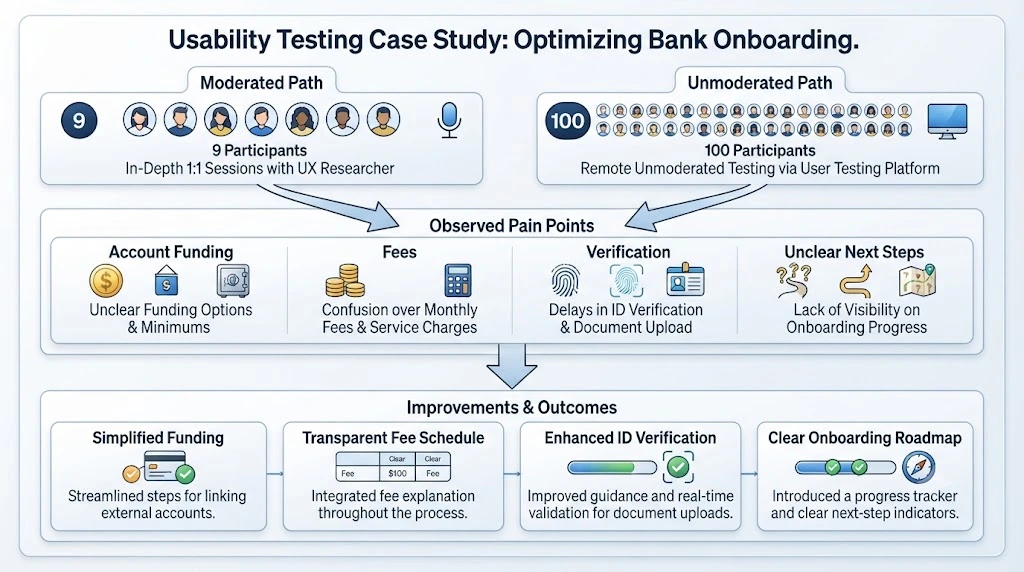
The situation. An online-only bank with more than $40 billion in assets had redesigned its savings account onboarding flow. Users had been dropping off at several points, so the team shortened and streamlined the process. Before releasing it, they wanted to know what problems remained.
The testing. Marketade turned the high-fidelity mock-ups into a simple clickable prototype. Then it ran two types of tests:
- Moderated: 9 participants matching the bank’s target profiles, in 30-minute video sessions.
- Unmoderated: 100 participants who completed the prototype alone and answered questions afterward.
What they found. Funding a new account was a common pain point in both groups. The unmoderated users said they were unsure about funding terms and timing, but their answers were short.
The moderated sessions explained why. Users were unclear about how the next steps worked, confused by certain terms, uneasy about instant verification security and annoyed by extra tasks. Almost all moderated participants also tried to open the Fee Schedule link or asked about fees.
What they recommended. The fixes were mostly clarity fixes: more explanatory copy for the funding choice, plain language on verification screens, time expectations stated first, and more direct headings on the final screen. Overall, the project produced 40 improvement ideas.
The lesson for you. In this study, the unmoderated results helped identify what users were struggling with, while the moderated sessions provided more detail about why those problems occurred. The testing was conducted before the revised flow was released to the wider customer base.
Source: Marketade’s bank onboarding usability case study, last updated November 14, 2025. The case study reports research findings and recommendations, not a conversion lift.
What to Test in Different Onboarding Flows
The method is one question. The product type is another. Here is what changes depending on what you are building.
SaaS Onboarding Flow
A SaaS onboarding flow usually moves through signup, workspace or account setup, integrations and a first key action.
Test whether users understand why they are connecting an integration. Check if they can reach the first key action without help. And see how long it takes before the product feels useful.
If you’re an early-stage B2B SaaS team still working on your first accounts, see our guide on how to get your first B2B SaaS customers. Those early customers are often the ones you will want in your test sessions.
App Onboarding Flow
An app onboarding flow begins at install or first open. Then it covers account creation, permissions and the first-use experience.
Test the timing of permission requests. A notification prompt on the very first screen, before the user knows why, can feel premature. Also test how the app behaves on slow connections and smaller screens.
B2B Product Onboarding
B2B onboarding involves more people. Test workspace or team setup, invites, admin steps and role-based setup.
Watch what happens when the person signing up is not the person who will use the tool every day. That handoff can be a weak spot.
Common User Onboarding Flow Problems to Look For
When you review your test sessions, watch for these patterns:
- Too many onboarding steps
- Asking for information too early
- Unclear CTAs
- A generic welcome message
- Forced tutorials
- Too many permission requests
- No visible progress
- Users who don’t know what to do next
- First value arriving too late
- Errors with no useful way to recover
Prioritize problems that repeatedly appear, block important tasks, or prevent users from reaching first value.
How to Prioritize Onboarding Problems Before Launch
After testing, you will have a long list. You can’t fix everything before launch. Here is how to choose.
Severity
What happens if this problem stays? Does it annoy users, or does it make them leave?
Frequency
How many test users ran into it? A problem that appears repeatedly across relevant participants may deserve more attention than an issue seen only once, especially when it also blocks an important task.
Impact on First Value
Does it stop users from reaching the core value of your product? If yes, it goes to the top.
Effort to Fix
Can it be solved with a copy edit this afternoon, or does it need weeks of development?
A simple prioritization framework you can use is: Impact × Frequency × Fixability. High impact, seen often and easy to fix? Do it first.
Use it as a practical decision aid rather than a formal scoring standard.
Onboarding Flow Examples: What Should You Test?
This section shows what a real flow looks like in practice. The point of these onboarding flow examples is not to copy them. It is to practice spotting what to test. The products below are illustrative, so swap in your own first-value action.
Simple Signup-to-Value Flow
- Entry point: A landing page signup button
- Main steps: Email signup → verification → short welcome → first action
- First-value action: For example, in an invoicing product, the first-value action might be sending a first invoice
- Potential friction: Verification emails that arrive late or land in spam
- What to test: Whether users know what to do right after verifying
SaaS Setup Flow
- Entry point: Free trial or demo signup
- Main steps: Account creation → workspace setup → integration → first project
- First-value action: For example, in a project-management tool, it might be seeing a first project filled with real tasks
- Potential friction: Integrations that ask for broad access without explaining why
- What to test: Whether users understand the permission and can finish setup alone
Mobile App First-Use Flow
- Entry point: App install and first open
- Main steps: Intro screens → account creation → permissions → first use
- First-value action: For example, in a habit-tracking app, it might be logging a first habit
- Potential friction: Swipe-through intro screens users skip, and early permission pop-ups
- What to test: Whether users can reach the first action without reading the intro
Pre-Launch User Onboarding Testing Checklist
Use this list for your final sign-off:
- Signup works
- Verification works
- Welcome message is clear
- Every CTA is understandable
- Required fields are justified
- Permissions are explained
- Users know what to do next
- Core onboarding steps work
- Errors are recoverable
- Users reach first value
- Important onboarding events are tracked
- Mobile and responsive flow tested
- Fresh users tested
- Major friction points fixed
- Flow retested after changes
Common Mistakes When Testing a User Onboarding Flow
Testing Only With the Internal Team
Your colleagues know the product. They will breeze through screens that confuse a newcomer.
Giving Test Users Too Much Guidance
If you explain each step, you are no longer testing the flow. You are testing your explanation.
Testing Only the Happy Path
Users may mistype emails, skip fields, go back, abandon a step, or encounter unexpected states. Test errors, empty states and wrong turns too.
Measuring Completion Without Measuring Activation
A user can click through every screen and still never reach meaningful value. Track both.
Fixing Every Minor Issue Before Major Blockers
A typo on screen two matters less than a confusing step that stops people from finishing. Sort by impact first.
Launching Without Retesting After Changes
Fixes can create new problems. Always run one more round before you ship.
Frequently Asked Questions
How do you test a user onboarding flow?
Define the first-value action, map every step, then watch representative first-time users try to reach it without guidance. Note where they hesitate or stop, measure completion and activation, fix the biggest blockers and retest with fresh users.
How many users should test an onboarding flow before launch?
There is no universal number. For a qualitative usability test, five participants can be a practical starting point when they closely match the target audience. If you have multiple distinct user groups, test each important group separately. Larger samples may be appropriate when your goal is to estimate quantitative metrics rather than identify usability problems.
What should you measure in user onboarding?
Track onboarding completion rate, step-level drop-off, time to first value, activation rate, error rate and support requests. Judge these against your own product’s activation definition, not a generic benchmark.
What is the difference between onboarding testing and usability testing?
Usability testing checks how easy any part of a product is to use. Onboarding testing is narrower. It focuses on the path from signup to first value and asks whether new users can complete it and understand why it matters.
How do you test onboarding before a product launch?
Use a clickable prototype, a staging build or a beta group. Run moderated sessions to understand confusion, add unmoderated tests for scale and check that important onboarding events are tracked. Fix the highest-impact issues and retest before release.
What makes a good onboarding flow?
A well-designed onboarding flow helps users reach the product’s intended first value with the information and guidance they need, without unnecessary steps. It also asks only for necessary information, explains permissions, shows progress and helps people recover from errors. The best way to know is to watch real first-time users try it.
Final Takeaway
Don’t wait until launch to find out that new users can’t figure out what to do.
Test the complete user onboarding flow with representative first-time users. Measure where they struggle and whether they reach first value. Fix the highest-impact friction first, then retest before you ship.
A short round of first-time-user testing can give you evidence about where people struggle before you expose the flow to a larger audience.
Once your onboarding is ready, the next challenge is bringing the right people into the product. See our guide on how to get your first 100 customers.
Ready to test your onboarding? Use the checklist above to plan your first round of first-time-user sessions, record where users hesitate or stop, and retest after fixing the biggest problems.