
OKRs for Small Startup Teams: 5 Steps With a Full Example

In a team of three, everyone is busy all day. That does not mean everyone is working on the same thing.
One person fixes bugs. One answers customers. One writes outreach emails. By Friday, a lot has happened, but nobody can say if the business moved forward.
That is the gap OKRs fill. This guide shows you how to use OKRs for small startup teams without turning them into a heavy corporate process. By the end, you will know how to write your first OKR set, check it, and track it every week.
What Are OKRs for Small Startup Teams?
OKR stands for Objectives and Key Results. It is a goal-setting method that links a clear direction with results you can check.
- Objective: What you want to achieve. It is short, clear, and written in plain words.
- Key Result: How you will know you got there. It has a metric, a starting point, a target, and a deadline.
A small team uses the same idea, only with fewer moving parts. Google explains how it uses OKRs, including its habit of setting ambitious stretch goals, in its re:Work guide to setting goals with OKRs. The examples in this article use committed targets instead, which are easier for a small team to plan around.
Goal vs. Key Result vs. Task
These three get mixed up all the time. Here is the difference.
| Type | What it answers | Example |
|---|---|---|
| Objective | Where do we want to go? | Turn more trial users into paying customers |
| Key Result | How will we measure progress? | Raise trial-to-paid conversion from 6% to 10% |
| Task | What will we do this week? | Rewrite the welcome email |
A task can be finished without changing anything. A Key Result shows whether something actually changed. Most Key Results track a number. Some are milestones, such as “launch the paid plan.” For a small team, numeric Key Results are the easiest to track, so this guide uses them.
A Quick Example
Objective: Make our first week of onboarding easier.
Key Result: Increase the share of new trial users who send their first approval request within 24 hours of signup from 30% to 50% by 24 January 2027.
The objective gives direction. The key result gives proof.
OKRs vs. KPIs: What Is the Difference?
OKRs define a goal and the measurable results a team wants to achieve within a set period. KPIs track ongoing performance, such as trial-to-paid conversion rate or customer response time.
For example, trial-to-paid conversion may be a KPI when tracked continuously. If the team commits to increasing it from 6% to 10% by 24 January, it becomes a Key Result within an OKR.
Small startups can use both: KPIs show how the business is performing, while OKRs identify the changes the team is trying to make.
How to Set OKRs for a Small Team: 5 Practical Steps
You do not need software or a long workshop. You need about an hour and an honest look at the business.
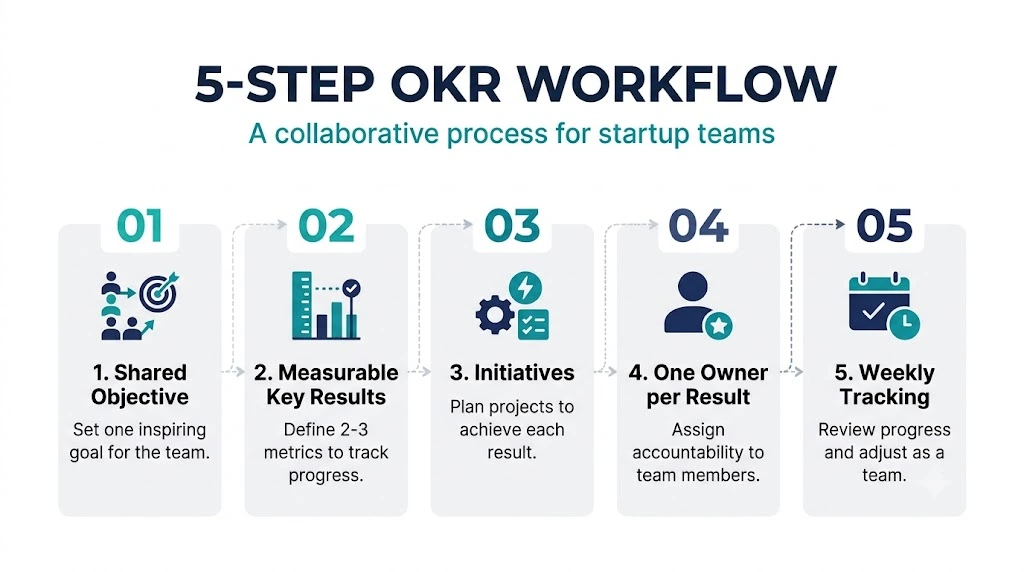
Step 1: Pick One Shared Objective
Start with the one thing that matters most for the next 90 days. Ask: “If we only improve one area in this cycle, which one?”
Write it as a direction, not a number. Keep it under 15 words.
For a team of two to five people, one objective is a good starting point. Add a second only if the team can still remember both without looking at the sheet.
Step 2: Set Two or Three Measurable Key Results
Now add the proof. Each Key Result should include:
- a metric (what you measure),
- a clear definition (who or what is counted, and over which period),
- a baseline (where you are today),
- a target (where you want to be),
- a deadline.
Two or three Key Results work well for most small teams. Past that, they get hard to remember and to track.
Step 3: Separate Key Results From Initiatives
An initiative is the work you plan to do. A Key Result is the change you hope to see.
“Launch a new onboarding checklist” is an initiative. “Increase the share of trial users who complete setup within 24 hours of signup from 30% to 50%” is a Key Result.
Keeping them apart helps in a practical way: if an initiative does not move the number, you change the initiative, not the goal.
Step 4: Give Every Key Result One Owner
Each Key Result needs one name next to it. Not two. Not “the team.”
The owner does not do all the work. They make sure the number is checked and the next step is clear. If you are a founder carrying every role, this is also a good moment to look at tasks to delegate as a startup founder so owners have room to work.
Step 5: Decide How You Will Measure Progress
Pick the tracking method before the cycle starts. Use one formula for every Key Result:
Progress % = (Current − Baseline) ÷ (Target − Baseline) × 100
It works whether the number should go up or down. If reply time should fall from 18 hours to 4 hours, and today it is 11 hours, then (11 − 18) ÷ (4 − 18) × 100 = 50%.
Two notes. First, this is a progress calculation, not a score of overall business success. Second, the result can go above 100% or below 0%. Decide in advance whether your sheet shows the real value or caps it between 0% and 100%.
Then hold a 15-minute check-in once a week. Update the numbers. Decide what to change. Put it on the calendar as a fixed slot and treat it like a customer meeting, so it does not get pushed aside.
OKR Examples for Small Teams: A Complete Startup Example
A full example shows how the pieces fit together. This is a fictional company, built to teach. All numbers are illustrative, not industry benchmarks.
Meet the Team
Proofline is a B2B SaaS tool that helps small agencies collect client approvals. The team has three people:
- Meera, founder, handles sales and pricing.
- Arjun, developer, handles the product.
- Nisha, customer success and marketing, handles trial users.
The Situation
Proofline gets about 200 trial signups a month, with a 14-day free trial. Only a small group becomes paying customers. Many trial users sign up, look around once, and disappear.
The business priority for the next 90 days is simple: get more trial users to become paying customers.
The cycle runs from 26 October 2026 to 24 January 2027, which is 90 days.
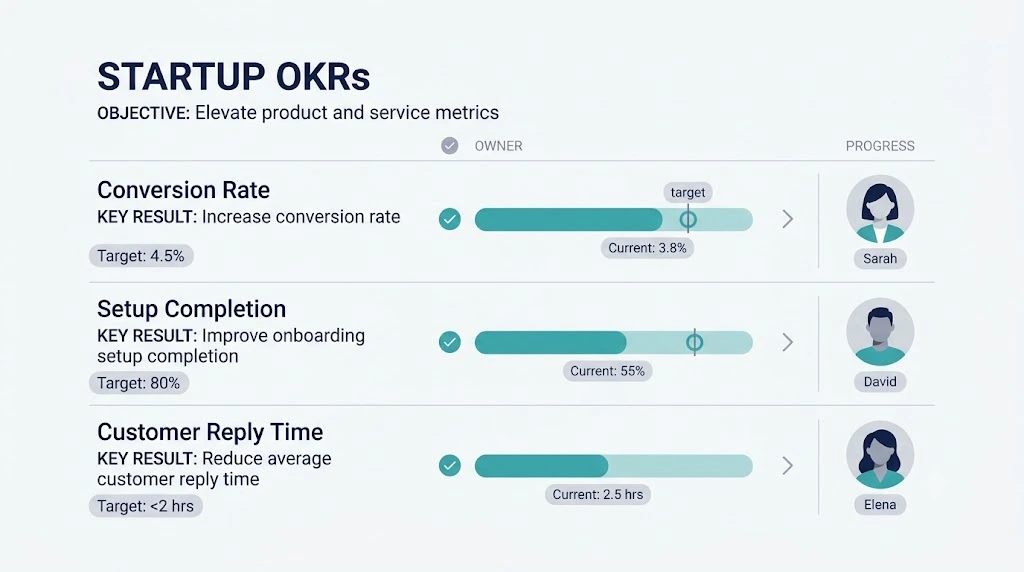
The OKR Set
Objective: Turn more trial users into paying customers.
| # | Key Result | Baseline | Target | Deadline | Owner |
|---|---|---|---|---|---|
| KR1 | Trial-to-paid conversion rate | 6% | 10% | 24 Jan 2027 | Meera |
| KR2 | Trial users who finish setup within 24 hours | 30% | 50% | 24 Jan 2027 | Arjun |
| KR3 | Median time to first reply to trial user questions | 18 hours | 4 hours | 24 Jan 2027 | Nisha |
How Each Key Result Is Measured
A number without a definition can be read three different ways. So the team writes down exactly what is counted.
| # | What counts | Who is included | Time window |
|---|---|---|---|
| KR1 | A trial user who becomes a paying customer | All new trial signups in the cohort, excluding internal and test accounts | Same rule for every cohort: a user counts if they pay within 21 days of signup. Baseline cohort: trials started in September 2026. Target cohort: trials started 1–31 December 2026. |
| KR2 | “Setup complete” means the user connects a first client and sends a first approval request | All new trial accounts created in the period, excluding internal and test accounts | The request must be sent within 24 hours of signup |
| KR3 | Time from a trial user’s question to the first human reply, measured in elapsed hours, weekends included | Every question from a trial user, by email or in-app chat | The median of all eligible questions received in the last 30 days, using the same rule at every check-in |
One rule keeps KR1 fair: compare like with like. The September baseline and the December result both use the same 21-day window, and a cohort is counted only after every user in it has had the full 21 days. The last December signup gets that time on 21 January, three days before the deadline. Counting a cohort earlier would make its conversion look lower than it really is.
KR1 measures the main business outcome: trial-to-paid conversion. KR2 and KR3 track changes the team believes may support that outcome, but faster setup and replies do not guarantee higher conversion. At each check-in, the team looks at real data to see whether they actually move together.
Initiatives vs. Expected Outcomes
Initiatives are the actions. Expected outcomes are the changes you hope to see. They are not the same.
| Initiative | Owner | Expected outcome |
|---|---|---|
| Cut the signup form from 8 fields to 4 | Arjun | More users reach the setup screen |
| Add a 3-step setup checklist inside the app | Arjun | Setup completion (KR2) goes up |
| Send a welcome email with a one-click start link | Nisha | More trial users begin setup on day one |
| Set a daily 10 a.m. inbox check for trial questions | Nisha | Reply time (KR3) goes down |
| Offer a 15-minute onboarding call to users who stall | Meera | More trial users reach a buying decision (KR1) |
If setup completion stays flat after three weeks, the checklist may not be the right fix. You swap the initiative. The Key Result stays. If you need ideas for the checklist and welcome email, our guide to the user onboarding flow is a good place to start.
A Check-In Example
Here is a hypothetical check-in six weeks in, on about 7 December. These readings are made up to show the method. They are not real data or benchmarks.
| Key Result | Baseline | Current | Target | Progress |
|---|---|---|---|---|
| KR1 Trial-to-paid (trials started up to 15 Nov) | 6% | 7.5% (illustrative) | 10% | 37.5% |
| KR2 Setup in 24 hours | 30% | 38% | 50% | 40% |
| KR3 Reply time | 18 hrs | 11 hrs | 4 hrs | 50% |
Every row uses the same formula. For KR1, the mid-cycle reading uses only cohorts whose full 21-day window has already ended. On 7 December, that means trials started up to 15 November, since the last of them reached day 21 on 6 December. The team applies the same payment rule used for the baseline and writes the cohort dates next to the conversion rate. The final result will use the December cohort once every signup in it has had 21 days to convert.
In this made-up scenario, the team can see that KR1 is trailing. That tells them where to spend the next two weeks.
How to Check the Quality of Your OKRs
Before you lock your set, run it through these questions:
- Can a new teammate understand the objective in one reading?
- Does every Key Result include a baseline, a target, and a deadline?
- Is it clear who or what is counted, and over which time window?
- Could you measure each one from real data, such as your analytics, CRM, or inbox?
- Does each Key Result describe a result, not a task?
- Does each Key Result have exactly one owner?
If you answer “no” to any of these, rewrite that line before the cycle begins.
A Simple OKR Template for a 2–5 Person Startup
A good template should be small enough to fill in on a Monday morning.
Use the same eight fields for every OKR:
| Field | What to write |
|---|---|
| Objective | One clear sentence about the direction |
| Key Result | A measurable outcome with a metric and a clear definition |
| Baseline | The starting number today |
| Target | The number you want by the deadline |
| Deadline | A fixed date, usually the end of the 90-day cycle |
| Owner | One person’s name |
| Initiatives | The actions you plan to take |
| Progress | Current value and progress % |
The template uses the same Proofline scenario you just read, with the same three Key Results. Copy the example row by row, then swap in your own numbers.
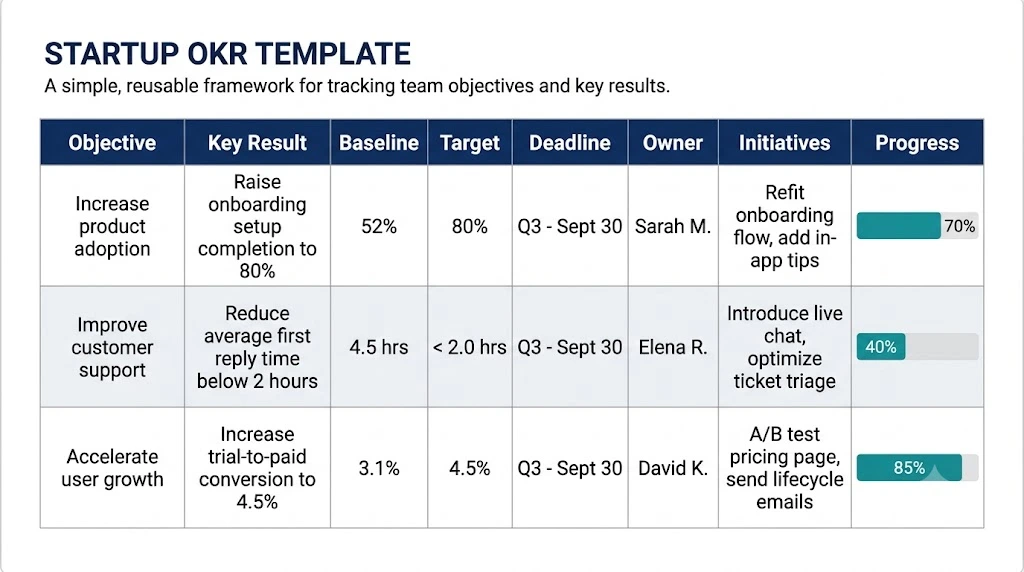
Get the template: [OKR_TEMPLATE_DOWNLOAD_URL] — a ready-to-copy Google Sheets file with the Proofline example filled in.
Common OKR Mistakes in Small Startups
Most OKR problems come from trying to do too much. These five show up most often.
1. Choosing Too Many Objectives
Five objectives for three people means no clear objective. Start with one.
2. Treating Tasks as Key Results
“Send 50 cold emails” is a task. “Book 8 demo calls from outreach” is a result. If you can finish it without changing a number, it is a task.
3. Skipping Baselines and Deadlines
A target without a baseline is a guess. A target without a deadline is a wish. Write both down.
4. Goals That Do Not Fit Together
If Meera wants more sales, Arjun wants a full redesign, and Nisha wants more blog posts, the team pulls in three directions. Every Key Result should support the shared objective.
5. Making Tracking Too Complicated
If updating your OKRs takes an hour, you will stop doing it. One sheet, one weekly check-in, one formula is enough.
Frequently Asked Questions
How many OKRs should a startup team of 2–5 people have?
One objective per cycle is a practical starting point. Some teams can handle two. If people cannot recall the objectives without opening the sheet, you probably have too many.
How many Key Results should each Objective include?
Two or three works well for most small teams. One may not show the full picture. More than three becomes hard to track.
How often should a small startup review its OKRs?
A short weekly check-in of about 15 minutes keeps numbers fresh. Many teams add a deeper review at the midpoint and a reset at the end of each 90-day cycle.
Can a small startup track OKRs in Google Sheets?
Yes. For a team of 2–5, Google Sheets is usually enough. You need columns for the objective, key result, baseline, target, deadline, owner, initiatives, and progress. A dedicated OKR tool can wait until the team grows.
What is the difference between OKRs and a task list?
A task list says what you will do. OKRs say what should change because of that work. Tasks support the Key Results, and the Key Results show whether the tasks helped.
Final Thoughts
Good OKRs for small startup teams are not complicated. Pick one objective. Add two or three measurable Key Results with clear definitions. Give each one an owner. Check the numbers every week.
Start small. Use the Proofline example as your guide, fill in the template above with your own numbers, and hold your first 15-minute check-in next Monday.