
How Solo SaaS Founders Can Replan Their Week When Actual Work Exceeds Available Time

You plan Monday like a pro. By Wednesday, a payment bug, three support emails and one “quick question” have eaten the plan alive.
If that sounds familiar, you are not bad at planning. Your plan just had no room for the work a solo SaaS founder really gets. Customer requests, bugs and the chores of running a product land in the same hours you promised to the roadmap. Some of that you can automate repetitive startup operations to reduce, but not all of it.
This guide is time management for solopreneurs without the fluff. You will learn how to replan your week using real hours. There are four steps, a worked example and a worksheet you can use next Monday.
Why Your Original Weekly Plan Stops Working
A weekly plan is a set of guesses. Most of those guesses are made on a calm Sunday night.
Then the week happens. Support takes longer than you assumed. A bug shows up at the worst time. A task you called “two hours” turns into five.
The real damage is not the lost hours. It is what gets squeezed. Product work and growth work usually go first, because nobody emails you when the roadmap slips.
So the fix is not a better to-do list. The fix is a plan built on what your weeks actually look like.
Step 1: Calculate Your Actual Weekly Capacity
Start with the hours you really have, not the hours you wish you had.
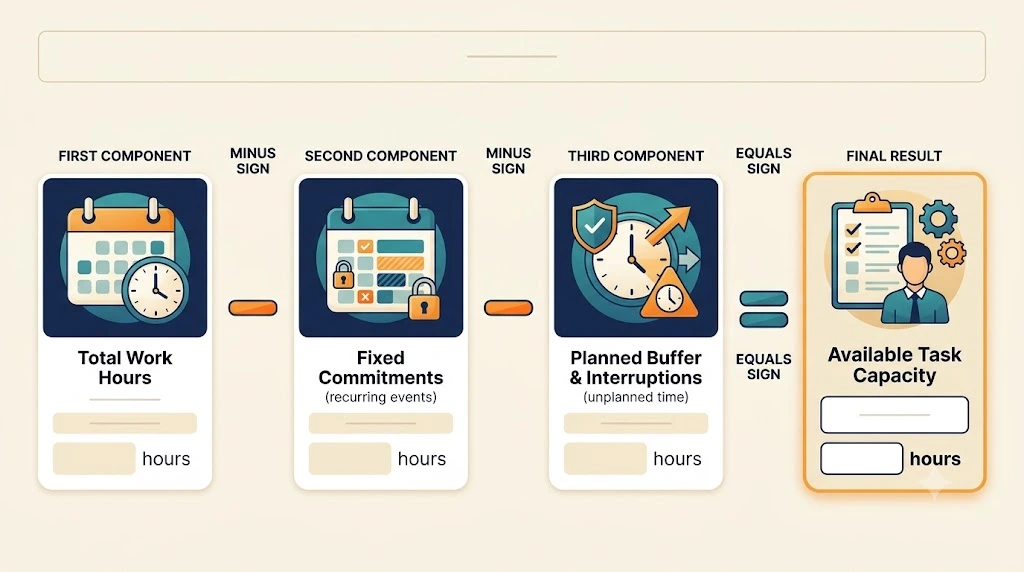
Here is the formula:
Available task capacity = total work hours − fixed commitments − planned buffer
- Total work hours: the hours you will honestly work this week.
- Fixed commitments: customer calls, billing, admin and anything that happens whatever else goes on.
- Planned buffer: time set aside for the unplanned stuff.
Say you work 35 hours. Fixed commitments take 5. You hold back 5 as a buffer. That leaves 25 hours for planned tasks.
One more thing: hours are not all equal. Paul Graham’s essay on the maker’s schedule versus manager’s schedule explains why. Building a product needs long, uninterrupted stretches, and a few scattered gaps do not add up to the same thing. So count your deep-work blocks separately from your loose hours.
Step 2: Compare Planned Hours With Actual Hours
Now look back at last week. Write down how many hours you planned and how many you actually spent.
Group the work into three buckets: product development, customer support and growth. Three is enough. More buckets just make the habit harder to keep.
Then work out the variance for each one:
Variance = Actual hours − Planned hours
A positive number means the task took longer than you estimated. A negative number means it took less. Neither is automatically good or bad. A task that ran short might be done well, or it might have been quietly skipped.
Look for patterns. If support is over your estimate every single week, the estimate is wrong, not the week.
A founder who tracked his time
Here is a real example of why this step matters. Lasan Nishshanka, a startup founder, wrote about tracking his hours with Toggl Track in a September 2025 newsletter post. By his own account, he felt like he was working 9 to 10 hours a day. His time logs showed about 3 to 4 hours of tracked work, and sometimes up to 6.
This is one person’s self-reported experience, not a study, and it says nothing about how many hours you should expect to work. The point is smaller: how a week feels and what it contains can be far apart, and you only see the gap when you write the hours down.
If you want a tool for this, time tracking and timesheet reports from RescueTime are one option. A plain spreadsheet works just as well.
The first section of the worksheet below is built for this step, with planned and actual hours side by side.
Step 3: Decide What to Keep, Move, Reduce or Drop
This is the step that makes the difference. You have the numbers. Now you have to make choices.
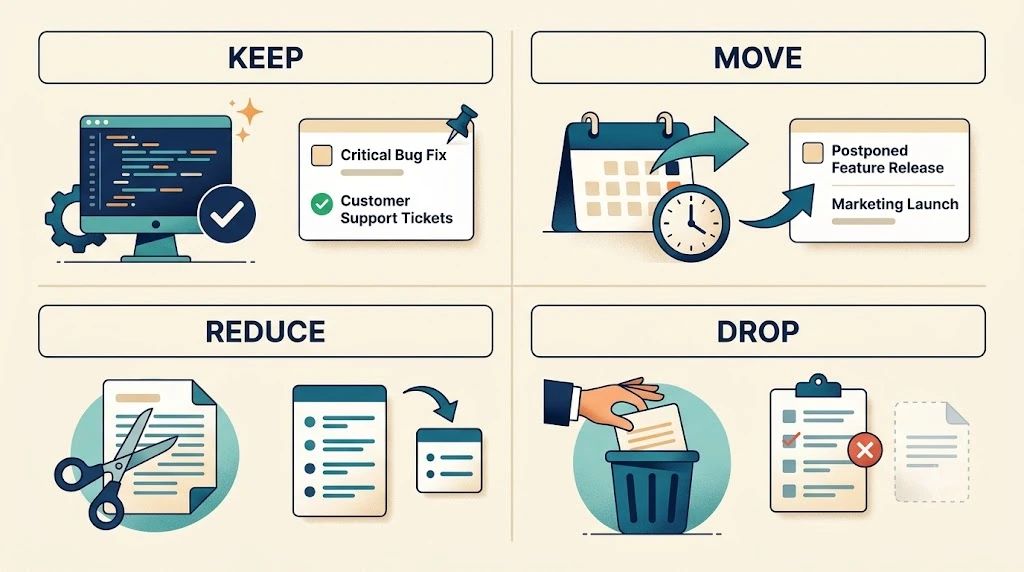
Go through every task and give it one of four labels:
- Keep: high priority and still doable this week. Leave it alone.
- Move: important, but there is no capacity left. Push it to a named future week, not “someday.”
- Reduce: shrink the scope so you still make real progress. Ship the core, skip the polish.
- Drop: low value and not worth doing anymore. Cross it off without guilt.
Not every interruption deserves the same response, and not every customer request is urgent. Triage by severity and impact. Ask two questions: how badly is this hurting the customer, and how many customers does it touch? Failed payments for several accounts need attention now. A how-to question or a feature request can usually wait for a support window. If you treat them the same, everything feels urgent and nothing gets finished.
Also pay attention to tasks that keep landing in “reduce” week after week. The real question may be whether they need you at all. A list of tasks to delegate as a startup founder can help you decide.
Step 4: Rebuild Next Week Using Actual Workload
Now you plan the next week, and this time you use real numbers.
- Recalculate your capacity. Use the same formula, but with an honest view of next week’s calendar.
- Update your interruption estimates. If support ran far over its estimate, do not plan the same number again.
- Fit product and growth work inside the available hours. If it does not fit, go back to keep, move, reduce or drop.
- Protect the buffer. Do not fill it back up with “just one more task.”
When you add growth work, pick one or two actions that bring in customers instead of starting six channels. Our guide to practical ways to get SaaS customers is a good place to choose from.
Time management for solopreneurs starts with real hours
This is also the simplest answer to how to plan your work week when you work alone. Plan from last week’s actuals, not from your best-case self.
Worked Example: Replan a Week After Unexpected Work
Let’s walk through one. The founder here is fictional, and every number is illustrative. They are not industry benchmarks.
Meet Maya. She runs a small invoicing tool on her own. Her week looks like this:
- Total work hours: 40
- Fixed commitments: 6 (customer calls and billing admin)
- Buffer: 6
- Task capacity: 28 hours
She plans a full 28 hours across product, support and growth. Then a payment webhook starts failing, and support emails pile up.
By Friday, here is what the week looked like:
| Task | Planned | Actual | Variance | Priority | Next-week action | Revised |
|---|---|---|---|---|---|---|
| Onboarding checklist | 12 | 9 | −3 | High | Reduce (ship the 3-step core) | 8 |
| Dashboard filters | 6 | 2 | −4 | Medium | Move (to the week after) | 0 |
| Customer support | 3 | 11 | +8 | High | Keep (update the estimate) | 8 |
| Payment webhook bug | 0 | 9 | +9 | High | Keep (follow-up only) | 2 |
| Blog post | 4 | 4 | 0 | Medium | Reduce (shorter post) | 2 |
| Cold outreach | 3 | 1 | −2 | Low | Drop | 0 |
| Referral asks (new) | n/a | n/a | n/a | Medium | Keep (new task) | 2 |
| Total | 28 | 36 | +8 | 22 |
What the numbers showed
Maya planned 28 task hours and spent 36. Add her 6 fixed-commitment hours and the week came to 42 hours, which is 2 more than her 40-hour week. Another way to see it: tasks and buffer together had room for 34 hours (28 + 6), and she used 36.
The overrun came from support (8 hours over plan) and the webhook bug (9 hours that were never planned). Together that is 17 extra hours. Under-spending on the onboarding checklist, dashboard filters and outreach absorbed 9 of them, which is why the net variance is +8.
What she decided
She kept support and gave it an honest estimate of 8 hours. She kept the webhook work but cut it to follow-up and alerts. She reduced the onboarding checklist to its three core steps and moved the dashboard filters out of the week.
She dropped cold outreach, since it got one hour and no response. In its place she added two hours to ask a few happy customers for introductions. If you want to set that up properly, here is how to build a customer referral process.
Her revised week
Maya raised her buffer from 6 hours to 10. Last week’s support and bug work added up to 17 hours beyond plan, far more than a 6-hour buffer could cover. Her new capacity is 40 − 6 − 10 = 24 hours. She committed to 22, and left 2 hours open on purpose.
One week of data is a small sample. Treat 10 hours as a starting point, not a rule. Maya should check it again after two or three weeks before she settles on a number.
Download the Solo SaaS Weekly Replanning Worksheet
You do not need to build this from scratch. The worksheet follows the same logic as the example above.
It has four tabs: Weekly Plan, Actual Work Log, Replanning Decisions and Read Me. The Replanning Decisions tab uses these columns:
| Field | Purpose |
|---|---|
| Task / work category | Identify the work |
| Planned hours | Your original estimate |
| Actual hours | Real time spent |
| Variance | Actual minus planned |
| Priority | Business importance |
| Next-week action | Keep, move, reduce or drop |
| Revised hours | Your updated commitment |
Ready to stop guessing? Download the sheet, fill in last week, and see where your hours really went.

A 15-Minute Weekly Replanning Routine
Pick one fixed time each week. Friday afternoon or Sunday evening both work. Then run through this:
- Review planned versus actual hours (4 minutes). Fill in the actual column and check the variance.
- Find the main source of overruns (3 minutes). Usually it is one or two tasks, not everything.
- Make carry-forward decisions (5 minutes). Give every unfinished task a label: keep, move, reduce or drop.
- Set next week’s commitments (3 minutes). Write down the revised hours and stop there.
That is the whole routine. It is just a quick way to use the worksheet, nothing more.
Frequently Asked Questions
What should a solo SaaS founder do when urgent work disrupts the plan?
Handle the urgent issue first, then log the hours it took. At the end of the day, decide which planned tasks to move or reduce so the rest of the week stays realistic.
How should unfinished tasks be handled?
Treat them as fresh decisions, not automatic carry-overs. Anything you move needs a specific week, or it will keep slipping.
How often should planned-versus-actual hours be reviewed?
Once a week is enough for most solo founders. After a few weeks, look at the pattern across weeks to adjust your buffer and your estimates.
Should every task be tracked by time?
No. Track the main work categories, such as product, support and growth. That gives you a useful picture without turning your week into admin.
Conclusion: Use Actual Hours to Make Better Commitments
A good plan is not one that never breaks. It is one you can fix quickly.
Measure your capacity, compare planned and actual hours, decide what to keep, move, reduce or drop, and rebuild the next week from real numbers. That small loop is the best form of time management for solo founders, because it stops you from promising hours you do not have.
Run the worksheet above on last week, then test the new plan for one week. See how it feels to finish what you committed to.